Chess Clock1.0.28
Publisher Description



Chess Clock on Android with an intuitive UI.
A fully featured and intuitive Chess Clock App that can be a replacement for your chess clock. The app is COMPLETELY FREE(no ads!)
While the app is completely free, I’ve added an optional '$ Thanks' feature for those who wish to support independent development. This is entirely voluntary and does not affect the app's functionality.
Select a time control and play. Press on your clock to start the opponent's timer and vice versa.
Features
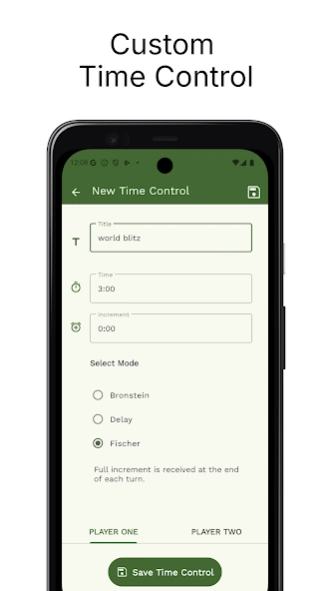
- Create custom time controls. The app supports Fischer, Bronstein, and delay modes.
- Ability to adjust clock time during the game.
- Allows different times for both players.
- Allows portrait and landscape orientation for the chess clock.
- Contains a list of popular time controls for a quick start.
- Pause the clock at any time. It is also automatically paused if the app is interrupted.
- Edit and delete existing time controls.
- Dark theme support.
About Chess Clock
The company that develops Chess Clock is mansoorcm. The latest version released by its developer is 1.0.28.
To install Chess Clock on your Android device, just click the green Continue To App button above to start the installation process. The app is listed on our website since 2026-03-29 and was downloaded 1 times. We have already checked if the download link is safe, however for your own protection we recommend that you scan the downloaded app with your antivirus. Your antivirus may detect the Chess Clock as malware as malware if the download link to com.mansoorcm.chessclock is broken.
How to install Chess Clock on your Android device:
- Click on the Continue To App button on our website. This will redirect you to Google Play.
- Once the Chess Clock is shown in the Google Play listing of your Android device, you can start its download and installation. Tap on the Install button located below the search bar and to the right of the app icon.
- A pop-up window with the permissions required by Chess Clock will be shown. Click on Accept to continue the process.
- Chess Clock will be downloaded onto your device, displaying a progress. Once the download completes, the installation will start and you'll get a notification after the installation is finished.
Program Details
System requirements
Download information
Pricing
Version History
version 1.0.28
posted on 2026-03-29
What’s New:
- Added a settings option to choose whether or not to automatically pause the clock when leaving the app.
Thank you for using the Chess Clock app!
version 1.0.26
posted on 2026-01-20
What’s New:
- Dark Theme support.
- Faster App Startup: I’ve optimized the code to make it much faster.
Thanks for being part of the journey!
version 1.0.25
posted on 2026-01-08
I've added a new way for you to support the ongoing development of Chess Clock! The app is still completely free, and if you find the app helpful, you can now send a special '$ Thanks' directly from the settings. Thanks for being part of the journey!
version 1.0.21
posted on 2025-10-24
What’s new:
• Detailed info displayed for each time control.
• Improved animations for a better user experience.
• Minor performance improvements.
Thanks for using our app and for your continued support!
version 1.0.17
posted on 2025-09-08
What’s new
• The clock screen now respects your phone’s auto-rotate setting for a smoother experience.
Thanks for your continued support and for using our app!
